















Indicators · Trend
Williams Alligator
Three smoothed averages that spread apart in trends and intertwine in ranges.
Origin: Bill Williams, 1995
- Best suited to
- Trending markets
- Responsiveness
- Lagging
- Family
- Trend
What it is
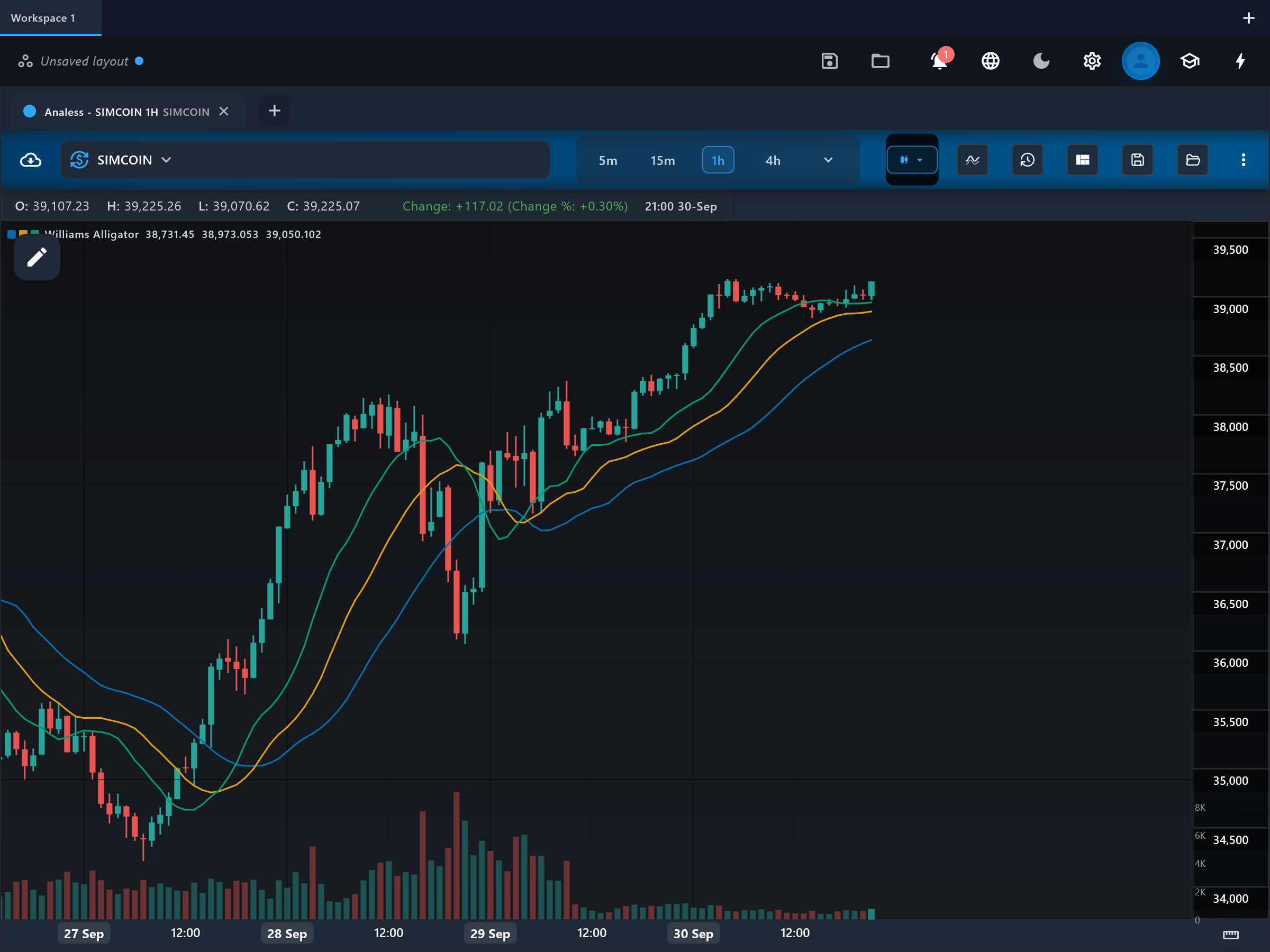
The Williams Alligator is three smoothed moving averages - the jaw, teeth and lips - each pushed forward on the chart. Bill Williams framed them as an alligator that sleeps when the lines intertwine and awakens to feed when they fan apart in order.
How it is calculated
All three lines are smoothed moving averages (SMMAs, i.e. Wilder smoothing) of the bar midpoint (high plus low, halved): the jaw over 13 bars shifted 8 forward, the teeth over 8 bars shifted 5 forward, and the lips over 5 bars shifted 3 forward. The forward shifts stagger the lines in time, so a genuine trend must pull the fast line away from the slower ones before an "open mouth" can appear.
How to read it
On the price chart you see jaw (slowest, traditionally blue), teeth (middle, red) and lips (fastest, green), each displaced to the right of the bars that produced it. Lines braided tightly together mean the alligator is sleeping - a range; trade nothing from the Alligator there. Lips above teeth above jaw, all fanning apart with price above them, is the eating-upward posture; the inverted stack below price is the downtrend posture. The lines converging again after a run signals the alligator is sated and the trend is ending.
What to look for
- Trend filterUpside
lips above teeth above jaw, with the three fanning apart and price above them, marks an established uptrend ("eating phase").
- Trend filterDownside
lips below teeth below jaw with price beneath all three marks an established downtrend.
- Range expansionContext
Price breaking away from a long sleeping (intertwined) phase as the lines start to separate is the awakening - the highest-quality Alligator setup.
- ConfirmationContext
The lines crossing back into a braid after a trend signals the move is over and it is time to stand aside.
When to use it
The Alligator suits markets that alternate clear ranges with strong breakouts - forex, commodities and crypto on 1-hour to daily charts. Williams designed it as the regime backbone of his system, pairing it with fractals for entries and the Awesome Oscillator for momentum. It is deliberately USELESS during the sleep phase - that is its message, not its failure - so do not force signals from intertwined lines.
Works well with
Settings explained
jawPeriod- Default 13. Smoothing length of the slowest line (the jaw). Raising it makes the sleep/awake distinction stricter but later.
jawShift- Default 8. How many bars the jaw is drawn ahead of price. Larger shifts push the line further right, delaying when price appears to interact with it.
teethPeriod- Default 8. Smoothing length of the middle line (the teeth), the reference many Williams traders use for trailing exits.
teethShift- Default 5. Forward displacement of the teeth; keeps the middle line staggered between jaw and lips.
lipsPeriod- Default 5. Smoothing length of the fastest line (the lips), the first to react when a sleeping market wakes.
lipsShift- Default 3. Forward displacement of the lips. Reducing shifts (toward zero) turns the Alligator into a plain three-SMMA ribbon.
Limitations and common mistakes
- Three smoothed and forward-shifted averages are doubly delayed - awakening signals confirm well after the breakout bar.
- The forward displacement means the line drawn under today's price was computed from older bars; beginners often misread the shift as prediction.
- In prolonged chop the lines separate briefly and re-braid, producing false awakenings.
References
- Origin: Bill Williams, 1995.
- Bill Williams (trader) — Wikipedia (opens in a new tab)
This page explains how an indicator is calculated and read. It describes past data, not what price will do next, and it is not a recommendation to trade. Read the disclaimers.
Try it in Analess
Add Williams Alligator to any chart, adjust its settings, and open this explainer from the indicator itself.